Boost Productivity and Enhance Customer Engagement

Seamless Integration with Outlook
The new Outlook integration extends intelliflo office user experience and seamlessly blends into advisors’ daily use of Outlook

Streamline and Automate Data Entry
Manual and automated tools for archiving clients’ email correspondence and documents in intelliflo office. Save time, minimize manual work and ensure that every client interaction is accurately logged and easily traceable in intelliflo office.

Save Time and Boost Productivity
A side-panel in Outlook automatically identifies client’s and leads emails and provides instant visibility and access to their records and recent business activities. Quickly browse, search and access intelliflo office records directly from Outlook.

Rule-Based Auto-Email Archiving
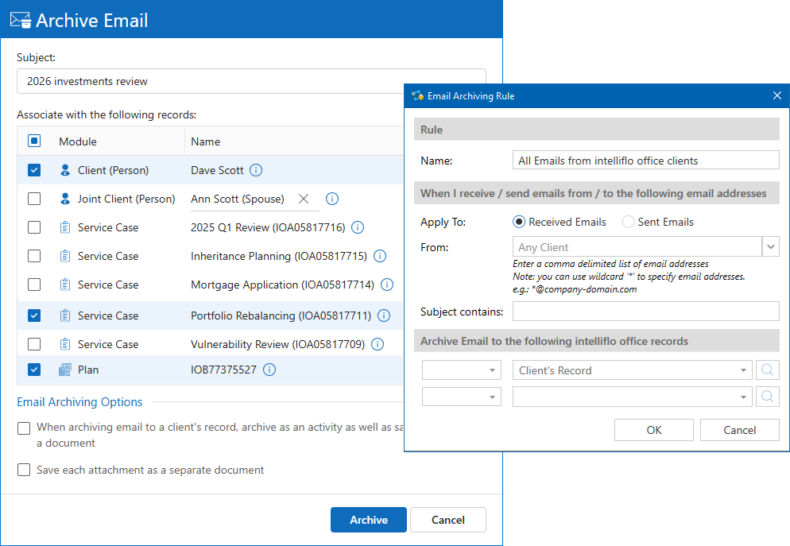
Create your own custom rules or enforce corporate-level rules for automatically archiving clients’ and leads’ emails in intelliflo office.

Keep Calendars in full Two-Way Sync
Outlook / Teams and intelliflo office calendars are fully and bi-directionally synchronized. Manual or automatic sync of selected or all meetings with clients and leads.

Centrally Install & Manage
The Outlook add-in is installed centrally on the corporate 365 account or users' personal accounts. Manage users through 365 admin center.
Use Outlook as an Extension of intelliflo office
No Extra Steps, No Learning Curve, just Smarter Work
Implicit Outlook integration extends intelliflo office functionality and user experience into Outlook by providing:
- Side-Panel – Runs alongside your inbox, automatically identifying client’s and leads’ emails and providing contextual information and instant visibility into their intelliflo office records, enabling you to respond faster and more effectively.
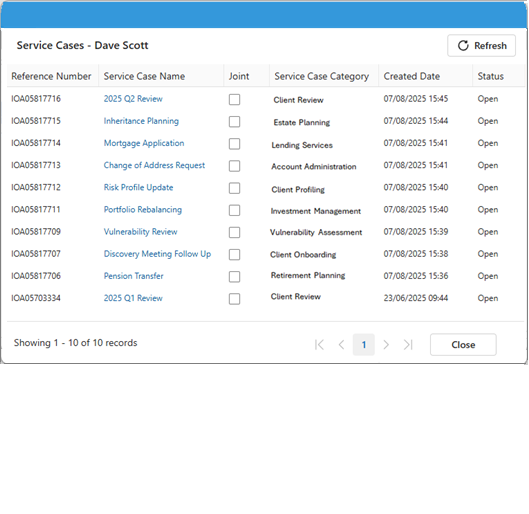
- Access intelliflo office Records – Browse, search and access intelliflo office records directly from Outlook.
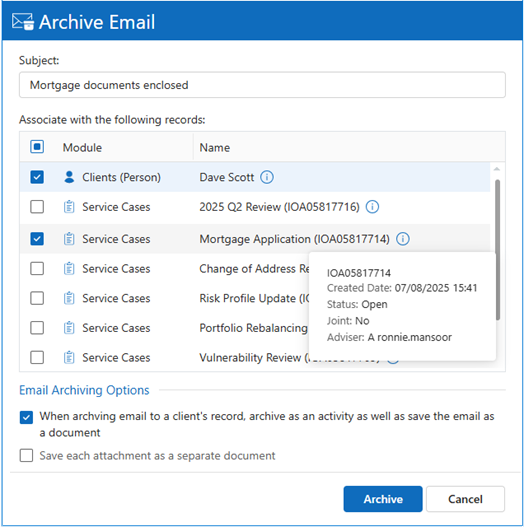
- Manual Email Archiving – Provides variety of tools ranging from a single-click to advanced multi-record options.
- Auto-Email Archiving – Streamline and automate data flow from Outlook including emails and documents by defining custom rules for automatic email archiving into intelliflo office.
- Corporate Policies – intelliflo office admins can centrally configure and enforce corporate-level policies related to the archiving of emails and attachments.
- Calendar Sync – Full two-way sync of Outlook / Teams calendars with intelliflo office.
- Centralized Installation – The Outlook add-in is installed and managed via Microsoft 365 Admin Center.
Comparison with Current Intelliflo Outlook Integration
| Product Comparison | New Outlook Integration | Current Outlook Integration |
|---|---|---|
| Email side-panel | ||
| Browsing intelliflo office records directly from Outlook | ||
| Viewing / opening intelliflo office records directly from Outlook | ||
| Searching clients / leads in Outlook | ||
| Relating emails to clients / leads' records | Automatic + Manual | Manual |
| Outlook – intelliflo office diary sync | ||
| Relating appointments to clients / leads' records | Automatic + Manual | Manual |
| One-click email archiving | ||
| Email archiving as documents to service cases, plans & tasks | ||
| Simultaneous email archiving to multiple records | ||
| Auto-email archiving rules | ||
| Centralized deployment via Microsoft 365 ; Centralized administration | ||
| Admin enforcement of corporate email archiving policies | ||
| Outlook Version | Classic + New Outlook | Classic Only |